Before beginning classes at the University of South Carolina, complete the health
and well-being requirements that apply to you. Review each item below, note the deadlines
and take action early to avoid registration holds or delays.
Start early: Complete all applicable items by the posted deadlines to avoid a registration hold.
Required Immunizations
The University of South Carolina requires the following immunizations for all new
students:
The first dose must be administered on or after your first birthday, and the second
dose at least 28 days after initial dose.
Please note: A positive titer for MMR is acceptable, however, if negative for any
of the three you will be required to have two doses of MMR separated by 28 days.
Students under age 21 years of age will need the Meningococcal ACYW (Meningitis) vaccine
(Menactra, Menveo, or MenQuadfi).
Note: Meningococcal B vaccine (Bexsero or Trumenba) is recommended, however; **Meningococcal B does NOT fulfill the meningococcal requirement.
Click TB Screen Risk Questionnaire
Click theUpdatebutton and answer each question.
ClickSubmit
*If tuberculosis testing is required, the system will automatically prompt you after
completing the TB Screen Risk Questionnaire.To fulfill this requirement, you must have either aQuaniFeronGold or T-Spotblood test performed within the past one (1) year and aChest X-rayperformed within the past three (3) months, all testing performed in the U.S.
Please review the steps below. If you have any questions, please contact AIT Clinic
within Student Health at 803-777-9511. You can also visit the Immunizations Table
during your New Student Orientation session:
Freshman Orientation – The immunizations staff will be available from 8 a.m. - 10 a.m. in the Russell
House University Union, room 205.
Transfer Orientation (and any one-day sessions) – The immunizations staff will be available from 8 a.m. - 9 a.m. in the Russell House
University Union, room 205.
Steps to Complete Your Immunization Requirements:
Take clear photos or scan your immunization documents. Make sure all information is
readable.
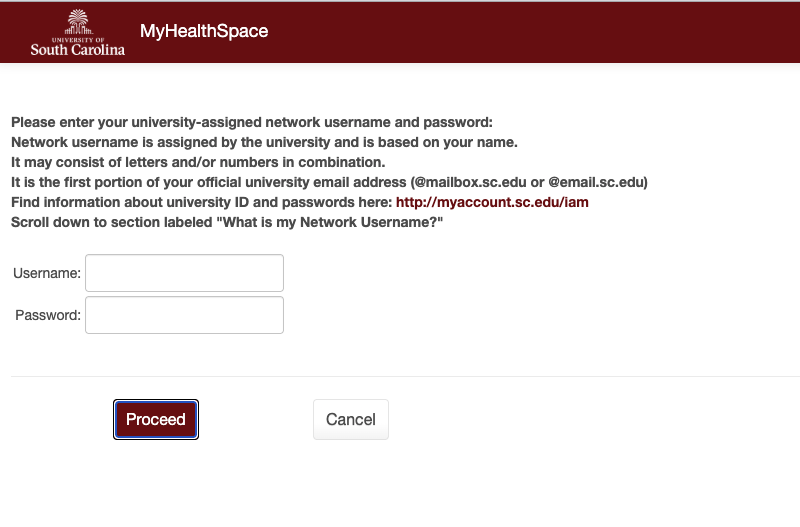
Visit MyHealthSpace, select Student Faculty and Staff, and sign in using your USC
network username and password. Follow the prompts to enter your date of birth.
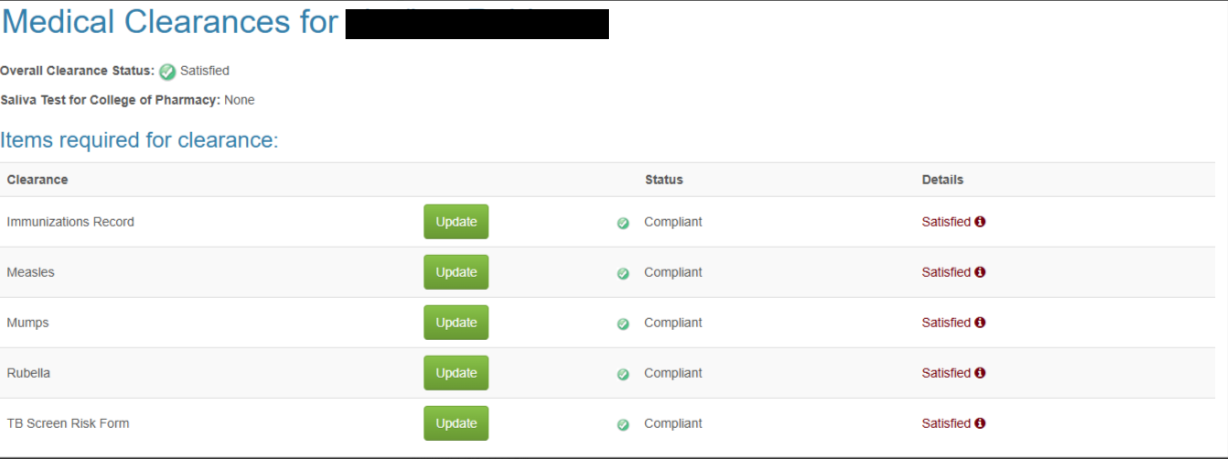
Open the menu and select Medical Clearances. Select Update beside Immunization Record, then Upload to add your documents. Scroll to the bottom and select Save.
Select Update beside each immunization. Enter your vaccination dates and select the vaccine type.
If submitting blood test results (titers), enter the test date and results.
Select Update beside TB Screen Risk Questionnaire, answer every question, and select Submit. Follow any instructions for additional testing.
One week before orientation, return to Medical Clearances. Confirm that every item under Items required for clearance has a green check.
Entering Immunization Dates and/or Titers
Click Update next to each Immunization.
Add date of immunization under Date 1.
Select type of vaccine under Vaccine 1 by clicking the down arrow on the right. (This must be completed for each vaccine).
If adding Titers, enter date titers were drawn under Date and select the result. (This must be completed for each Titer).
Required Community Education
These interactive and engaging trainings educate students on creating a safe and healthy
campus environment and are based in research around the best practices for college
students. Topics include substance misuse, sexual assault and interpersonal violence,
mental well-being, and belonging. Failure to complete these courses may result in
a registration hold.
To Start
Log in to Self-Service Carolina and use the links under the Community Education tab or check your USC email. If you
do not see an email in your university account, be sure to look in the Other folder.
Fall 2026
August 18: Part 1 Due
October 18: Part 2 Due
Yes if:
This is your first semester at USC Columbia, You are a freshman, transfer, change-of-campus, Gamecock Gateway, Pathways or international
student, You are a returning or readmitted student who did not complete the courses when previously
enrolled. Note: There is no exception for age or prior professional training.
After Part One of Either Course: If you complete Part One after Part Two deadline, you must email sape@sc.edu to have your hold lifted for 45 days while you are in the intersession.
After Part Two of Either Course: The hold will remove itself within 24 hours. This may mean you will have to wait
to register for classes.
Trouble accessing AlcoholEdu or RespectEdu: Contact the Help Desk if you are having trouble accessing Vector from your Self-Service Carolina account. Email helpdesk@sc.edu or call 803-777-1800.
Issues with Vector’s website: The “Help” button in the upper right-hand corner of every course screen will take
you to 24/7 online support. You may also submit a support ticket here.